
4.6 kB
Dora pipeline Robots
AlexK Low Cost Robot is a low-cost robotic arm that can be teleoperated using a similar arm. This repository contains
the Dora pipeline to manipulate the arms, the camera, and record/replay episodes with LeRobot.
Recording
This section explains how to record episodes for LeRobot using the AlexK Low Cost Robot.
Recording is the process of tele operating the robot and saving the episodes to a dataset. The dataset is used to train
the robot to perform tasks autonomously.
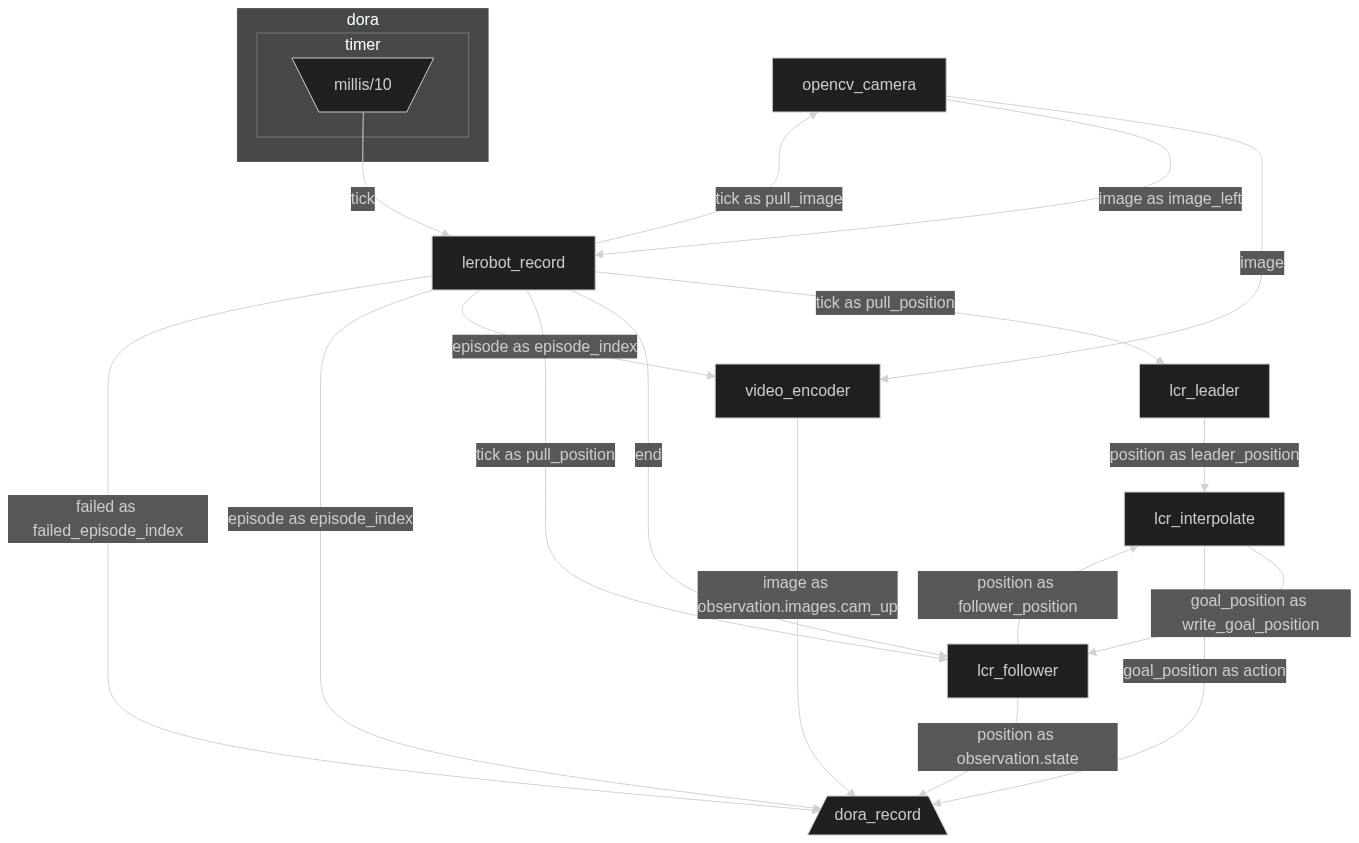
To record episodes with Dora, you have to configure the Dataflow record_mono_teleop_real.yml file to integrate the
arms and the camera. The graph file is located in the graphs folder.
Make sure to:
- Adjust the serial ports of
lcr-leaderandlcr-followerin therecord_mono_teleop_real.ymlfile. - Adjust the camera PATH in the
record_mono_teleop_real.ymlfile. - Adjust image and video WIDTH and HEIGHT in the
record_mono_teleop_real.ymlfile, if needed. - Adjust recording framerate with your camera framerate in the
record_mono_teleop_real.ymlfile. - Adjust CONFIG path environment variables in the
record_mono_teleop_real.ymlfile for both arms if needed. - Adjust
LEADER_CONTROLandFOLLOWER_CONTROLenvironment variables in therecord_mono_teleop_real.ymlfile if
needed.
You can now start the Dora pipeline to record episodes for LeRobot:
cd dora

# If you are using a custom environment, you will have to activate it before running the command
source [your_custom_env_bin]/activate

# If you followed the installation instructions, you can run the following command
source venv/bin/activate # On Linux
source venv/Scripts/activate # On Windows bash
venv\Scripts\activate.bat # On Windows cmd
venv\Scripts\activate.ps1 # On Windows PowerShell

dora build ./examples/alexk-lcr/graphs/record_mono_teleop_real.yml # Only the first time, it will install all the requirements if needed

dora up
dora start ./examples/alexk-lcr/graphs/record_mono_teleop_real.yml
Then, you can tele operate the follower with the leader. A window will pop up showing the camera feed, and some text.
- Press space to start/stop recording
- Press return if you want to tell the recording that you failed the current episode, or the previous episode if you
have not started the current one - Close the window to stop the recording
- Write down the location of the logs (e.g
018fc3a8-3b76-70f5-84a2-22b84df24739), this is where the
dataset (and logs) are stored.
You can now use our script to convert the logs to an understandable dataset:
cd dora

# If you are using a custom environment, you will have to activate it before running the command
source [your_custom_env_bin]/activate

# If you followed the installation instructions, you can run the following command
source venv/bin/activate # On Linux
source venv/Scripts/activate # On Windows bash
venv\Scripts\activate.bat # On Windows cmd
venv\Scripts\activate.ps1 # On Windows PowerShell

python ./datasets/build_dataset.py --record-path [path_to_recorded_logs] --dataset-name [dataset_name] --framerate [framerate]
Note: On default, the framerate is 30. If you have recorded with a different framerate, you will have to adjust it.
The dora graph
License
This library is licensed under the Apache License 2.0.