
Are you sure you want to delete this task? Once this task is deleted, it cannot be recovered.
You can not select more than 25 topics
Topics must start with a chinese character,a letter or number, can include dashes ('-') and can be up to 35 characters long.
 Leonardo Pinheiro
ac53961bc8
Leonardo Pinheiro
ac53961bc8
|
1 year ago | |
|---|---|---|
| .. | ||
| public | 1 year ago | |
| .gitignore | 1 year ago | |
| README.md | 1 year ago | |
| _agents.py | 1 year ago | |
| _types.py | 1 year ago | |
| _utils.py | 1 year ago | |
| config.yaml | 1 year ago | |
| run.sh | 1 year ago | |
| run_editor_agent.py | 1 year ago | |
| run_group_chat_manager.py | 1 year ago | |
| run_host.py | 1 year ago | |
| run_ui.py | 1 year ago | |
| run_writer_agent.py | 1 year ago | |
README.md
Distributed Group Chat
from autogen_core.application import WorkerAgentRuntimeHost
This example runs a gRPC server using WorkerAgentRuntimeHost and instantiates three distributed runtimes using WorkerAgentRuntime. These runtimes connect to the gRPC server as hosts and facilitate a round-robin distributed group chat. This example leverages the Azure OpenAI Service to implement writer and editor LLM agents. Agents are instructed to provide concise answers, as the primary goal of this example is to showcase the distributed runtime rather than the quality of agent responses.
Setup
Setup Python Environment
- Create a virtual environment as instructed in README.
- Run
uv pip install chainlitin the same virtual environment
General Configuration
In the config.yaml file, you can configure the client_config section to connect the code to the Azure OpenAI Service.
Authentication
The recommended method for authentication is through Azure Active Directory (AAD), as explained in Model Clients - Azure AI. This example works with both the AAD approach (recommended) and by providing the api_key in the config.yaml file.
Run
Run Through Scripts
The run.sh file provides commands to run the host and agents using tmux. The steps for this approach are:
- Install tmux.
- Activate the Python environment:
source .venv/bin/activate. - Run the bash script:
./run.sh.
Here is a screen recording of the execution:
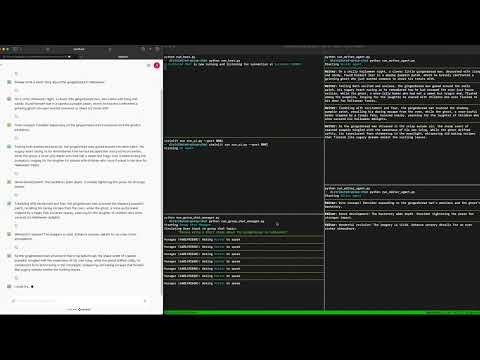
Note: Some asyncio.sleep commands have been added to the example code to make the ./run.sh execution look sequential and visually easy to follow. In practice, these lines are not necessary.
Run Individual Files
If you prefer to run Python files individually, follow these steps. Note that each step must be run in a different terminal process, and the virtual environment should be activated using source .venv/bin/activate.
python run_host.py: Starts the host and listens for agent connections.chainlit run run_ui.py --port 8001: Starts the Chainlit app and UI agent and listens on UI topic to display messages. We're using port 8001 as the default port 8000 is used to run host (assuming using same machine to run all of the agents)python run_editor.py: Starts the editor agent and connects it to the host.
python run_writer.py: Starts the writer agent and connects it to the host.
python run_group_chat_manager.py: Run chainlit app which starts group chat manager agent and sends the initial message to start the conversation.
What's Going On?
The general flow of this example is as follows:
- The UI Agent runs starts the UI App, listens for stream of messages in the UI topic and displays them in the UI.
- The Group Chat Manager, on behalf of

User, sends aRequestToSpeakrequest to the writer_agent. - The
writer_agentwrites a short sentence into the group chat topic. - The
editor_agentreceives the message in the group chat topic and updates its memory. - The Group Chat Manager receives the message sent by the writer into the group chat simultaneously and sends the next participant, the
editor_agent, aRequestToSpeakmessage. - The
editor_agentsends its feedback to the group chat topic. - The
writer_agentreceives the feedback and updates its memory. - The Group Chat Manager receives the message simultaneously and repeats the loop from step 1.
Here is an illustration of the system developed in this example:
graph TD;
    subgraph Host
        A1[GRPC Server]
        wt[Writer Topic]
        et[Editor Topic]
        ut[UI Topic]
        gct[Group Chat Topic]
    end
    all_agents[All Agents -  Simplified Arrows!] --> A1

    subgraph Distributed Writer Runtime
        wt -.->|2 - Subscription| writer_agent
        gct -.->|4 - Subscription| writer_agent
        writer_agent -.->|3.1 - Publish: UI Message| ut
        writer_agent -.->|3.2 - Publish: Group Chat Message| gct
    end

    subgraph Distributed Editor Runtime
        et -.->|6 - Subscription| editor_agent
        gct -.->|4 - Subscription| editor_agent
        editor_agent -.->|7.1 - Publish: UI Message| ut
        editor_agent -.->|7.2 - Publish: Group Chat Message| gct
    end

    subgraph Distributed Group Chat Manager Runtime
        gct -.->|4 - Subscription| group_chat_manager
        group_chat_manager -.->|1 - Request To Speak| wt
        group_chat_manager -.->|5 - Request To Speak| et
        group_chat_manager -.->|\* - Publish Some of to UI Message| ut
    end

    subgraph Distributed UI Runtime
        ut -.->|\* - Subscription| ui_agent
    end


    style wt fill:#beb2c3,color:#000
    style et fill:#beb2c3,color:#000
    style gct fill:#beb2c3,color:#000
    style ut fill:#beb2c3,color:#000
    style writer_agent fill:#b7c4d7,color:#000
    style editor_agent fill:#b7c4d7,color:#000
    style group_chat_manager fill:#b7c4d7,color:#000
    style ui_agent fill:#b7c4d7,color:#000
TODO:
This is a mirror of AutoGen from GitHub. AutoGen is a framework that enables the development of LLM applications using multiple agents that can converse with each other to solve tasks.
Python SVG Jupyter Notebook C# TSX other
Contributors (25+)
wang.chi@microsoft.com
jackgerrits@users.noreply.github.com
ekzhu@users.noreply.github.com
bigmiao.zhang@gmail.com
rysweet@microsoft.com
bnujli@gmail.com
qingyun.wu@psu.edu
gagb@users.noreply.github.com
liususan091219@users.noreply.github.com
adamfo@microsoft.com
kostapetan@gmail.com
davor@airt.ai
shaokunzhang529@gmail.com
32823396+kevin666aa@users.noreply.github.com
adam.fourney@gmail.com
victordibia@microsoft.com
qw2ky@virginia.edu
66362098+marklysze@users.noreply.github.com
49699333+dependabot[bot]@users.noreply.github.com
hahahah2021@163.com
jack@jackgerrits.com
Kosta.Petan@microsoft.com
qingyun0327@gmail.com
wael.karkoub96@gmail.com
chiw@microsoft.com