
5.7 kB
dora-cotracker
A Dora node that implements real-time object tracking using Facebook's CoTracker model. The node supports both interactive point selection via clicking and programmatic point input through Dora's messaging system.
Features
- Real-time object tracking using CoTracker
- Support for multiple tracking points
- Interactive point selection via mouse clicks
- Programmatic point input through Dora messages
- Visualization of tracked points with unique identifiers
Getting Started
Installation
Install using uv:
uv venv -p 3.11 --seed
uv pip install -e .
Demo Video
Watch a demonstration of the dora-cotracker node in action:
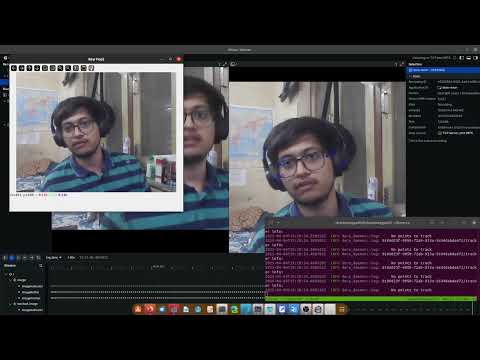
The video shows:
- Setting up the node
- Interactive point selection
- Real-time tracking performance
Basic Usage
- Create a YAML configuration file (e.g.,
demo.yml):
nodes:
  - id: camera
    build: pip install opencv-video-capture
    path: opencv-video-capture
    inputs:
      tick: dora/timer/millis/100
    outputs:
      - image
    env:
      CAPTURE_PATH: "0"
      ENCODING: "rgb8"
      IMAGE_WIDTH: "640"
      IMAGE_HEIGHT: "480"

  - id: tracker
    build: pip install -e dora-cotracker
    path: dora-cotracker
    inputs:
      image: camera/image
      points_to_track: input/points_to_track
    outputs:
      - tracked_image
      - tracked_points

  - id: display
    build: pip install dora-rerun
    path: dora-rerun
    inputs:
      image: camera/image
      tracked_image: tracker/tracked_image
Note - this only has the cv2 as an input source. see below to add your nodes workflow and pass points directly.
- Run the demo:
dora run demo.yml --uv
Usage Examples
1. Interactive Point Selection
Click points directly in the "Raw Feed" window to start tracking them:
- Left-click to add tracking points
- Points will be tracked automatically across frames
- Each point is assigned a unique identifier (C0, C1, etc. for clicked points and I0, I1, etc for input points)
2. Dynamic Point Integration
The node can receive tracking points from other models or nodes in your pipeline. Common use cases include:
- Tracking YOLO detection centroids
- Following pose estimation keypoints
- Monitoring segmentation mask centers
- Custom object detection points
example showing how to send tracking points through Dora messages using a custom input node:
import numpy as np
import pyarrow as pa
from dora import Node

class PointInputNode:
    def __init__(self):
        self.node = Node("point-input")

    def send_points(self, points):
        """
        Send points to tracker
        Args:
            points: Nx2 array of (x,y) coordinates
        """
        points = np.array(points, dtype=np.float32)
        self.node.send_output(
            "points_to_track",
            pa.array(points.ravel()),
            {
                "num_points": len(points),
                "dtype": "float32",
                "shape": (len(points), 2)
            }
        )

    def run(self):
        # Example: Track 3 points
        points = np.array([
            [320, 240],  # Center
            [160, 120],  # Top-left
            [480, 360]   # Bottom-right
        ])
        self.send_points(points)
To connect your existing node that outputs tracking points with the CoTracker node, add the following to your YAML configuration:
nodes:
  # Your existing point source node (e.g., YOLO detector, pose estimator, etc.)
  - id: point_source
    build: pip install your-node  # Replace with your node's name
    path: your-point-source-node  # Replace with your node's path
    inputs:
      image: camera/image  # If your node needs image input
    outputs:
      - points_to_track    # Must output points in required format

  # CoTracker node configuration
  - id: tracker
    build: pip install dora-cotracker
    path: dora-cotracker
    inputs:
      image: camera/image
      points_to_track: point_source/points_to_track  # Connect to your point source
    outputs:
      - tracked_image
      - tracked_points

  # Optional visualization
  - id: display
    build: pip install dora-rerun
    path: dora-rerun
    inputs:
      image: camera/image
      tracked_image: tracker/tracked_image
Your point source node must output points in the following format:
- Topic name:
points_to_track - Data: Flattened numpy array of x,y coordinates
- Metadata:
{
    "num_points": len(points),  # Number of points
    "dtype": "float32",        # Data type
    "shape": (N, 2)           # N points, 2 coordinates each
}
Example point source implementations:
- YOLO detection centroids
- Pose estimation keypoints
- Face landmark detectors
- Custom object detectors
For dynamic updates, send new points whenever your source node processes a new frame. The tracker will maintain temporal consistency between updates.
**
API Reference
Input Topics
image: Input video stream (RGB format)points_to_track: Points to track- Format: Flattened array of x,y coordinates
- Metadata:
num_points: Number of pointsdtype: "float32"shape: (N, 2) where N is number of points
Output Topics
tracked_image: Visualization with tracked pointstracked_points: Current positions of tracked points- Same format as input points
Development
Format code with ruff:
uv pip install ruff
uv run ruff check . --fix
Run tests:
uv pip install pytest
uv run pytest
License
dora-cotracker's code are released under the MIT License