|
123456789101112131415161718192021222324252627282930313233343536373839404142434445464748495051525354555657585960616263646566676869707172737475767778798081828384858687888990919293949596979899100101102103104105106107108109110111112113114115116117118119120121122123124125126127128129130131132133134135136137138139140141142143144145146147148149150151152153154155156157158159160161162163164165166167168169170171172173174175176177178179180181182183184185186187188189190191192193194195196197198199200201202203204205206207208209210211212213214215216217218219220221222223224225226227228229230231232233234235236237238239240241242243244245246247248249250251252253254255256257258259260261262263264265266267268269270271272273274275276277278279280281282283284285286287288289290291292293294295296297298299300301302303304305306307308309310311312313314315316317318319320321322323324325326327328329330331332333334335336337338339340341342343344345346347348349350351352353354355356357358359360361362363364365366367368369370371372373374375376377378379380381382383384385386387388389390391392393394395396397398399400401402403404405406407408409410411412413414415416417418419420421422423424425426427428429430431432433434435436437438439440441442443444445446447448449450451452453454455456457458459460461462463464465466467468469470471472473474475476477478479480481482483484485486487488489490491492493494495496497498499500501502503504505506507508509510511512513514515516517518519520521522523524525526527528529530531532533534535536537538539540541542543544545546547548549550551552553554555556557558559560561562563564565566567568569570571572573574575576577578579580581582583584585586587588589590591592 |
- 
-
- <!-- TOC -->
-
- - [MASS: Masked Sequence to Sequence Pre-training for Language Generation Description](#googlenet-description)
- - [Model architecture](#model-architecture)
- - [Dataset](#dataset)
- - [Features](#features)
- - [Script description](#script-description)
- - [Data Preparation](#Data-Preparation)
- - [Tokenization](#Tokenization)
- - [Byte Pair Encoding](#Byte-Pair-Encoding)
- - [Build Vocabulary](#Build-Vocabulary)
- - [Generate Dataset](#Generate-Dataset)
- - [News Crawl Corpus](#News-Crawl-Corpus)
- - [Gigaword Corpus](#Gigaword-Corpus)
- - [Cornell Movie Dialog Corpus](#Cornell-Movie-Dialog-Corpus)
- - [Configuration](#Configuration)
- - [Training & Evaluation process](#Training-&-Evaluation-process)
- - [Weights average](#Weights-average)
- - [Learning rate scheduler](#Learning-rate-scheduler)
- - [Model description](#model-description)
- - [Performance](#performance)
- - [Results](#results)
- - [Training Performance](#training-performance)
- - [Inference Performance](#inference-performance)
- - [Environment Requirements](#environment-requirements)
- - [Platform](#Platform)
- - [Requirements](#Requirements)
- - [Get started](#get-started)
- - [Pre-training](#Pre-training)
- - [Fine-tuning](#Fine-tuning)
- - [Inference](#Inference)
- - [Description of random situation](#description-of-random-situation)
- - [others](#others)
- - [ModelZoo Homepage](#modelzoo-homepage)
-
- <!-- /TOC -->
-
-
- # MASS: Masked Sequence to Sequence Pre-training for Language Generation Description
-
- [MASS: Masked Sequence to Sequence Pre-training for Language Generation](https://www.microsoft.com/en-us/research/uploads/prod/2019/06/MASS-paper-updated-002.pdf) was released by MicroSoft in June 2019.
-
- BERT(Devlin et al., 2018) have achieved SOTA in natural language understanding area by pre-training the encoder part of Transformer(Vaswani et al., 2017) with masked rich-resource text. Likewise, GPT(Raddford et al., 2018) pre-trains the decoder part of Transformer with masked(encoder inputs are masked) rich-resource text. Both of them build a robust language model by pre-training with masked rich-resource text.
-
- Inspired by BERT, GPT and other language models, MicroSoft addressed [MASS: Masked Sequence to Sequence Pre-training for Language Generation](https://www.microsoft.com/en-us/research/uploads/prod/2019/06/MASS-paper-updated-002.pdf) which combines BERT's and GPT's idea. MASS has an important parameter k, which controls the masked fragment length. BERT and GPT are specicl case when k equals to 1 and sentence length.
-
- [Introducing MASS – A pre-training method that outperforms BERT and GPT in sequence to sequence language generation tasks](https://www.microsoft.com/en-us/research/blog/introducing-mass-a-pre-training-method-that-outperforms-bert-and-gpt-in-sequence-to-sequence-language-generation-tasks/)
-
- [Paper](https://www.microsoft.com/en-us/research/uploads/prod/2019/06/MASS-paper-updated-002.pdf): Song, Kaitao, Xu Tan, Tao Qin, Jianfeng Lu and Tie-Yan Liu. “MASS: Masked Sequence to Sequence Pre-training for Language Generation.” ICML (2019).
-
-
- # Model architecture
-
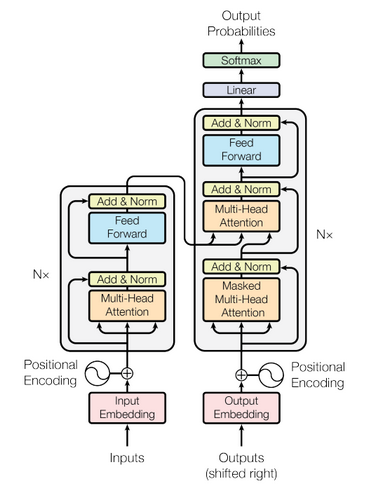
- The overall network architecture of MASS is shown below, which is Transformer(Vaswani et al., 2017):
-
- MASS is consisted of 6-layer encoder and 6-layer decoder with 1024 embedding/hidden size, and 4096 intermediate size between feed forward network which has two full connection layers.
-
- 
-
-
- # Dataset
-
- Dataset used:
- - monolingual English data from News Crawl dataset(WMT 2019) for pre-training.
- - Gigaword Corpus(Graff et al., 2003) for Text Summarization.
- - Cornell movie dialog corpus(DanescuNiculescu-Mizil & Lee, 2011).
-
- Details about those dataset could be found in [MASS: Masked Sequence to Sequence Pre-training for Language Generation](https://www.microsoft.com/en-us/research/uploads/prod/2019/06/MASS-paper-updated-002.pdf).
-
-
- # Features
-
- Mass is designed to jointly pre train encoder and decoder to complete the task of language generation.
- First of all, through a sequence to sequence framework, mass only predicts the blocked token, which forces the encoder to understand the meaning of the unshielded token, and encourages the decoder to extract useful information from the encoder.
- Secondly, by predicting the continuous token of the decoder, the decoder can build better language modeling ability than only predicting discrete token.
- Third, by further shielding the input token of the decoder which is not shielded in the encoder, the decoder is encouraged to extract more useful information from the encoder side, rather than using the rich information in the previous token.
-
-
- # Script description
-
- MASS script and code structure are as follow:
-
- ```text
- ├── mass
- ├── README.md // Introduction of MASS model.
- ├── config
- │ ├──config.py // Configuration instance definition.
- │ ├──config.json // Configuration file.
- ├── src
- │ ├──dataset
- │ ├──bi_data_loader.py // Dataset loader for fine-tune or inferring.
- │ ├──mono_data_loader.py // Dataset loader for pre-training.
- │ ├──language_model
- │ ├──noise_channel_language_model.p // Noisy channel language model for dataset generation.
- │ ├──mass_language_model.py // MASS language model according to MASS paper.
- │ ├──loose_masked_language_model.py // MASS language model according to MASS released code.
- │ ├──masked_language_model.py // Masked language model according to MASS paper.
- │ ├──transformer
- │ ├──create_attn_mask.py // Generate mask matrix to remove padding positions.
- │ ├──transformer.py // Transformer model architecture.
- │ ├──encoder.py // Transformer encoder component.
- │ ├──decoder.py // Transformer decoder component.
- │ ├──self_attention.py // Self-Attention block component.
- │ ├──multi_head_attention.py // Multi-Head Self-Attention component.
- │ ├──embedding.py // Embedding component.
- │ ├──positional_embedding.py // Positional embedding component.
- │ ├──feed_forward_network.py // Feed forward network.
- │ ├──residual_conn.py // Residual block.
- │ ├──beam_search.py // Beam search decoder for inferring.
- │ ├──transformer_for_infer.py // Use Transformer to infer.
- │ ├──transformer_for_train.py // Use Transformer to train.
- │ ├──utils
- │ ├──byte_pair_encoding.py // Apply BPE with subword-nmt.
- │ ├──dictionary.py // Dictionary.
- │ ├──loss_moniter.py // Callback of monitering loss during training step.
- │ ├──lr_scheduler.py // Learning rate scheduler.
- │ ├──ppl_score.py // Perplexity score based on N-gram.
- │ ├──rouge_score.py // Calculate ROUGE score.
- │ ├──load_weights.py // Load weights from a checkpoint or NPZ file.
- │ ├──initializer.py // Parameters initializer.
- ├── vocab
- │ ├──all.bpe.codes // BPE codes table(this file should be generated by user).
- │ ├──all_en.dict.bin // Learned vocabulary file(this file should be generated by user).
- ├── scripts
- │ ├──run.sh // Train & evaluate model script.
- │ ├──learn_subword.sh // Learn BPE codes.
- │ ├──stop_training.sh // Stop training.
- ├── requirements.txt // Requirements of third party package.
- ├── train.py // Train API entry.
- ├── eval.py // Infer API entry.
- ├── tokenize_corpus.py // Corpus tokenization.
- ├── apply_bpe_encoding.py // Applying bpe encoding.
- ├── weights_average.py // Average multi model checkpoints to NPZ format.
- ├── news_crawl.py // Create News Crawl dataset for pre-training.
- ├── gigaword.py // Create Gigaword Corpus.
- ├── cornell_dialog.py // Create Cornell Movie Dialog dataset for conversation response.
-
- ```
-
-
- ## Data Preparation
-
- The data preparation of a natural language processing task contains data cleaning, tokenization, encoding and vocabulary generation steps.
-
- In our experiments, using [Byte Pair Encoding(BPE)](https://arxiv.org/abs/1508.07909) could reduce size of vocabulary, and relieve the OOV influence effectively.
-
- Vocabulary could be created using `src/utils/dictionary.py` with text dictionary which is learnt from BPE.
- For more detail about BPE, please refer to [Subword-nmt lib](https://www.cnpython.com/pypi/subword-nmt) or [paper](https://arxiv.org/abs/1508.07909).
-
- In our experiments, vocabulary was learned based on 1.9M sentences from News Crawl Dataset, size of vocabulary is 45755.
-
- Here, we have a brief introduction of data preparation scripts.
-
-
- ### Tokenization
- Using `tokenize_corpus.py` could tokenize corpus whose text files are in format of `.txt`.
-
- Major parameters in `tokenize_corpus.py`:
-
- ```bash
- --corpus_folder: Corpus folder path, if multi-folders are provided, use ',' split folders.
- --output_folder: Output folder path.
- --tokenizer: Tokenizer to be used, nltk or jieba, if nltk is not installed fully, use jieba instead.
- --pool_size: Processes pool size.
- ```
-
- Sample code:
- ```bash
- python tokenize_corpus.py --corpus_folder /{path}/corpus --output_folder /{path}/tokenized_corpus --tokenizer {nltk|jieba} --pool_size 16
- ```
-
-
- ### Byte Pair Encoding
- After tokenization, BPE is applied to tokenized corpus with provided `all.bpe.codes`.
-
- Apply BPE script can be found in `apply_bpe_encoding.py`.
-
- Major parameters in `apply_bpe_encoding.py`:
-
- ```bash
- --codes: BPE codes file.
- --src_folder: Corpus folders.
- --output_folder: Output files folder.
- --prefix: Prefix of text file in `src_folder`.
- --vocab_path: Generated vocabulary output path.
- --threshold: Filter out words that frequency is lower than threshold.
- --processes: Size of process pool (to accelerate). Default: 2.
- ```
-
- Sample code:
- ```bash
- python tokenize_corpus.py --codes /{path}/all.bpe.codes \
- --src_folder /{path}/tokenized_corpus \
- --output_folder /{path}/tokenized_corpus/bpe \
- --prefix tokenized \
- --vocab_path /{path}/vocab_en.dict.bin
- --processes 32
- ```
-
-
- ### Build Vocabulary
- Support that you want to create a new vocabulary, there are two options:
- 1. Learn BPE codes from scratch, and create vocabulary with multi vocabulary files from `subword-nmt`.
- 2. Create from an existing vocabulary file which lines in the format of `word frequency`.
- 3. *Optional*, Create a small vocabulary based on `vocab/all_en.dict.bin` with method of `shink` from `src/utils/dictionary.py`.
- 4. Persistent vocabulary to `vocab` folder with method `persistence()`.
-
- Major interface of `src/utils/dictionary.py` are as follow:
-
- 1. `shrink(self, threshold=50)`: Shrink the size of vocabulary by filter out words frequency is lower than threshold. It returns a new vocabulary.
- 2. `load_from_text(cls, filepaths: List[str])`: Load existed text vocabulary which lines in the format of `word frequency`.
- 3. `load_from_persisted_dict(cls, filepath)`: Load from a persisted binary vocabulary which was saved by calling `persistence()` method.
- 4. `persistence(self, path)`: Save vocabulary object to binary file.
-
- Sample code:
- ```python
- from src.utils import Dictionary
-
- vocabulary = Dictionary.load_from_persisted_dict("vocab/all_en.dict.bin")
- tokens = [1, 2, 3, 4, 5]
- # Convert ids to symbols.
- print([vocabulary[t] for t in tokens])
-
- sentence = ["Hello", "world"]
- # Convert symbols to ids.
- print([vocabulary.index[s] for s in sentence])
- ```
-
- For more detail, please refer to the source file.
-
-
- ### Generate Dataset
- As mentioned above, three corpus are used in MASS mode, dataset generation scripts for them are provided.
-
- #### News Crawl Corpus
- Script can be found in `news_crawl.py`.
-
- Major parameters in `news_crawl.py`:
-
- ```bash
- Note that please provide `--existed_vocab` or `--dict_folder` at least one.
- A new vocabulary would be created in `output_folder` when pass `--dict_folder`.
-
- --src_folder: Corpus folders.
- --existed_vocab: Optional, persisted vocabulary file.
- --mask_ratio: Ratio of mask.
- --output_folder: Output dataset files folder path.
- --max_len: Maximum sentence length. If a sentence longer than `max_len`, then drop it.
- --suffix: Optional, suffix of generated dataset files.
- --processes: Optional, size of process pool (to accelerate). Default: 2.
- ```
-
- Sample code:
-
- ```bash
- python news_crawl.py --src_folder /{path}/news_crawl \
- --existed_vocab /{path}/mass/vocab/all_en.dict.bin \
- --mask_ratio 0.5 \
- --output_folder /{path}/news_crawl_dataset \
- --max_len 32 \
- --processes 32
- ```
-
-
- #### Gigaword Corpus
- Script can be found in `gigaword.py`.
-
- Major parameters in `gigaword.py`:
-
- ```bash
- --train_src: Train source file path.
- --train_ref: Train reference file path.
- --test_src: Test source file path.
- --test_ref: Test reference file path.
- --existed_vocab: Persisted vocabulary file.
- --output_folder: Output dataset files folder path.
- --noise_prob: Optional, add noise prob. Default: 0.
- --max_len: Optional, maximum sentence length. If a sentence longer than `max_len`, then drop it. Default: 64.
- --format: Optional, dataset format, "mindrecord" or "tfrecord". Default: "tfrecord".
- ```
-
- Sample code:
-
- ```bash
- python gigaword.py --train_src /{path}/gigaword/train_src.txt \
- --train_ref /{path}/gigaword/train_ref.txt \
- --test_src /{path}/gigaword/test_src.txt \
- --test_ref /{path}/gigaword/test_ref.txt \
- --existed_vocab /{path}/mass/vocab/all_en.dict.bin \
- --noise_prob 0.1 \
- --output_folder /{path}/gigaword_dataset \
- --max_len 64
- ```
-
-
- #### Cornell Movie Dialog Corpus
- Script can be found in `cornell_dialog.py`.
-
- Major parameters in `cornell_dialog.py`:
-
- ```bash
- --src_folder: Corpus folders.
- --existed_vocab: Persisted vocabulary file.
- --train_prefix: Train source and target file prefix. Default: train.
- --test_prefix: Test source and target file prefix. Default: test.
- --output_folder: Output dataset files folder path.
- --max_len: Maximum sentence length. If a sentence longer than `max_len`, then drop it.
- --valid_prefix: Optional, Valid source and target file prefix. Default: valid.
- ```
-
- Sample code:
-
- ```bash
- python cornell_dialog.py --src_folder /{path}/cornell_dialog \
- --existed_vocab /{path}/mass/vocab/all_en.dict.bin \
- --train_prefix train \
- --test_prefix test \
- --noise_prob 0.1 \
- --output_folder /{path}/cornell_dialog_dataset \
- --max_len 64
- ```
-
-
- ## Configuration
- Json file under the path `config/` is the template configuration file.
- Almost all of the options and arguments needed could be assigned conveniently, including the training platform, configurations of dataset and model, arguments of optimizer etc. Optional features such as loss scale and checkpoint are also available by setting the options correspondingly.
- For more detailed information about the attributes, refer to the file `config/config.py`.
-
- ## Training & Evaluation process
- For training a model, the shell script `run.sh` is all you need. In this scripts, the environment variable is set and the training script `train.py` under `mass` is executed.
- You may start a task training with single device or multiple devices by assigning the options and run the command in bash:
- ```bash
- sh run.sh [--options]
- ```
-
- The usage is shown as bellow:
- ```text
- Usage: run.sh [-h, --help] [-t, --task <CHAR>] [-n, --device_num <N>]
- [-i, --device_id <N>] [-j, --hccl_json <FILE>]
- [-c, --config <FILE>] [-o, --output <FILE>]
- [-v, --vocab <FILE>]
-
- options:
- -h, --help show usage
- -t, --task select task: CHAR, 't' for train and 'i' for inference".
- -n, --device_num device number used for training: N, default is 1.
- -i, --device_id device id used for training with single device: N, 0<=N<=7, default is 0.
- -j, --hccl_json rank table file used for training with multiple devices: FILE.
- -c, --config configuration file as shown in the path 'mass/config': FILE.
- -o, --output assign output file of inference: FILE.
- -v, --vocab set the vocabulary"
- ```
- Notes: Be sure to assign the hccl_json file while running a distributed-training.
-
- The command followed shows a example for training with 2 devices.
- ```bash
- sh run.sh --task t --device_num 2 --hccl_json /{path}/rank_table.json --config /{path}/config.json
- ```
- ps. Discontinuous device id is not supported in `run.sh` at present, device id in `rank_table.json` must start from 0.
-
-
- If use a single chip, it would be like this:
- ```bash
- sh run.sh --task t --device_num 1 --device_id 0 --config /{path}/config.json
- ```
-
-
- ## Weights average
-
- ```python
- python weights_average.py --input_files your_checkpoint_list --output_file model.npz
- ```
-
- The input_files is a list of you checkpoints file. To use model.npz as the weights, add its path in config.json at "existed_ckpt".
- ```json
- {
- ...
- "checkpoint_options": {
- "existed_ckpt": "/xxx/xxx/model.npz",
- "save_ckpt_steps": 1000,
- ...
- },
- ...
- }
- ```
-
-
- ## Learning rate scheduler
-
- Two learning rate scheduler are provided in our model:
-
- 1. [Polynomial decay scheduler](https://towardsdatascience.com/learning-rate-schedules-and-adaptive-learning-rate-methods-for-deep-learning-2c8f433990d1).
- 2. [Inverse square root scheduler](https://ece.uwaterloo.ca/~dwharder/aads/Algorithms/Inverse_square_root/).
-
- LR scheduler could be config in `config/config.json`.
-
- For Polynomial decay scheduler, config could be like:
- ```json
- {
- ...
- "learn_rate_config": {
- "optimizer": "adam",
- "lr": 1e-4,
- "lr_scheduler": "poly",
- "poly_lr_scheduler_power": 0.5,
- "decay_steps": 10000,
- "warmup_steps": 2000,
- "min_lr": 1e-6
- },
- ...
- }
- ```
-
- For Inverse square root scheduler, config could be like:
- ```json
- {
- ...
- "learn_rate_config": {
- "optimizer": "adam",
- "lr": 1e-4,
- "lr_scheduler": "isr",
- "decay_start_step": 12000,
- "warmup_steps": 2000,
- "min_lr": 1e-6
- },
- ...
- }
- ```
-
- More detail about LR scheduler could be found in `src/utils/lr_scheduler.py`.
-
-
- # Model description
-
- The MASS network is implemented by Transformer, which has multi-encoder layers and multi-decoder layers.
- For pre-training, we use the Adam optimizer and loss-scale to get the pre-trained model.
- During fine-turning, we fine-tune this pre-trained model with different dataset according to different tasks.
- During testing, we use the fine-turned model to predict the result, and adopt a beam search algorithm to
- get the most possible prediction results.
-
-
- 
-
-
- ## Performance
-
- ### Results
-
- #### Fine-Tuning on Text Summarization
- The comparisons between MASS and two other pre-training methods in terms of ROUGE score on the text summarization task
- with 3.8M training data are as follows:
-
- | Method | RG-1(F) | RG-2(F) | RG-L(F) |
- |:---------------|:--------------|:-------------|:-------------|
- | MASS | Ongoing | Ongoing | Ongoing |
-
- #### Fine-Tuning on Conversational ResponseGeneration
- The comparisons between MASS and other baseline methods in terms of PPL on Cornell Movie Dialog corpus are as follows:
-
- | Method | Data = 10K | Data = 110K |
- |--------------------|------------------|-----------------|
- | MASS | Ongoing | Ongoing |
-
- #### Training Performance
-
- | Parameters | Masked Sequence to Sequence Pre-training for Language Generation |
- |:---------------------------|:--------------------------------------------------------------------------|
- | Model Version | v1 |
- | Resource | Ascend 910, cpu 2.60GHz, 56cores;memory, 314G |
- | uploaded Date | 05/24/2020 |
- | MindSpore Version | 0.2.0 |
- | Dataset | News Crawl 2007-2017 English monolingual corpus, Gigaword corpus, Cornell Movie Dialog corpus |
- | Training Parameters | Epoch=50, steps=XXX, batch_size=192, lr=1e-4 |
- | Optimizer | Adam |
- | Loss Function | Label smoothed cross-entropy criterion |
- | outputs | Sentence and probability |
- | Loss | Lower than 2 |
- | Accuracy | For conversation response, ppl=23.52, for text summarization, RG-1=29.79. |
- | Speed | 611.45 sentences/s |
- | Total time | --/-- |
- | Params (M) | 44.6M |
- | Checkpoint for Fine tuning | ---Mb, --, [A link]() |
- | Model for inference | ---Mb, --, [A link]() |
- | Scripts | [A link]() |
-
-
- #### Inference Performance
-
- | Parameters | Masked Sequence to Sequence Pre-training for Language Generation |
- |:---------------------------|:-----------------------------------------------------------|
- | Model Version | V1 |
- | Resource | Huawei 910 |
- | uploaded Date | 05/24/2020 |
- | MindSpore Version | 0.2.0 |
- | Dataset | Gigaword corpus, Cornell Movie Dialog corpus |
- | batch_size | --- |
- | outputs | Sentence and probability |
- | Accuracy | ppl=23.52 for conversation response, RG-1=29.79 for text summarization. |
- | Speed | ---- sentences/s |
- | Total time | --/-- |
- | Model for inference | ---Mb, --, [A link]() |
-
-
- # Environment Requirements
-
- ## Platform
-
- - Hardware(Ascend)
- - Prepare hardware environment with Ascend processor. If you want to try Ascend, please send the [application form](https://obs-9be7.obs.cn-east-2.myhuaweicloud.com/file/other/Ascend%20Model%20Zoo%E4%BD%93%E9%AA%8C%E8%B5%84%E6%BA%90%E7%94%B3%E8%AF%B7%E8%A1%A8.docx) to ascend@huawei.com. Once approved, you could get the resources for trial.
- - Framework
- - [MindSpore](http://10.90.67.50/mindspore/archive/20200506/OpenSource/me_vm_x86/)
- - For more information, please check the resources below:
- - [MindSpore tutorials](https://www.mindspore.cn/tutorial/zh-CN/master/index.html)
- - [MindSpore API](https://www.mindspore.cn/api/zh-CN/master/index.html)
-
- ## Requirements
-
- ```txt
- nltk
- numpy
- subword-nmt
- rouge
- ```
-
- https://www.mindspore.cn/tutorial/zh-CN/master/advanced_use/network_migration.html
-
-
- # Get started
- MASS pre-trains a sequence to sequence model by predicting the masked fragments in an input sequence. After this, downstream tasks including text summarization and conversation response are candidated for fine-tuning the model and for inference.
- Here we provide a practice example to demonstrate the basic usage of MASS for pre-training, fine-tuning a model, and the inference process. The overall process is as follows:
- 1. Download and process the dataset.
- 2. Modify the `config.json` to config the network.
- 3. Run a task for pre-training and fine-tuning.
- 4. Perform inference and validation.
-
- ## Pre-training
- For pre-training a model, config the options in `config.json` firstly:
- - Assign the `pre_train_dataset` under `dataset_config` node to the dataset path.
- - Choose the optimizer('momentum/adam/lamb' is available).
- - Assign the 'ckpt_prefix' and 'ckpt_path' under `checkpoint_path` to save the model files.
- - Set other arguments including dataset configurations and network configurations.
- - If you have a trained model already, assign the `existed_ckpt` to the checkpoint file.
-
- Run the shell script `run.sh` as followed:
-
- ```bash
- sh run.sh -t t -n 1 -i 1 -c /mass/config/config.json
- ```
- Get the log and output files under the path `./run_mass_*/`, and the model file under the path assigned in the `config/config.json` file.
-
- ## Fine-tuning
- For fine-tuning a model, config the options in `config.json` firstly:
- - Assign the `fine_tune_dataset` under `dataset_config` node to the dataset path.
- - Assign the `existed_ckpt` under `checkpoint_path` node to the existed model file generated by pre-training.
- - Choose the optimizer('momentum/adam/lamb' is available).
- - Assign the `ckpt_prefix` and `ckpt_path` under `checkpoint_path` node to save the model files.
- - Set other arguments including dataset configurations and network configurations.
-
- Run the shell script `run.sh` as followed:
- ```bash
- sh run.sh -t t -n 1 -i 1 -c config/config.json
- ```
- Get the log and output files under the path `./run_mass_*/`, and the model file under the path assigned in the `config/config.json` file.
-
- ## Inference
- If you need to use the trained model to perform inference on multiple hardware platforms, such as GPU, Ascend 910 or Ascend 310, you can refer to this [Link](https://www.mindspore.cn/tutorial/zh-CN/master/advanced_use/network_migration.html).
- For inference, config the options in `config.json` firstly:
- - Assign the `test_dataset` under `dataset_config` node to the dataset path.
- - Assign the `existed_ckpt` under `checkpoint_path` node to the model file produced by fine-tuning.
- - Choose the optimizer('momentum/adam/lamb' is available).
- - Assign the `ckpt_prefix` and `ckpt_path` under `checkpoint_path` node to save the model files.
- - Set other arguments including dataset configurations and network configurations.
-
- Run the shell script `run.sh` as followed:
-
- ```bash
- sh run.sh -t i -n 1 -i 1 -c config/config.json -o {outputfile}
- ```
-
- # Description of random situation
-
- MASS model contains dropout operations, if you want to disable dropout, please set related dropout_rate to 0 in `config/config.json`.
-
-
- # others
- The model has been validated on Ascend environment, not validated on CPU and GPU.
-
-
- # ModelZoo Homepage
- [Link](https://gitee.com/mindspore/mindspore/tree/master/mindspore/model_zoo)
|

